
The Sustainability module in Business Central stands out from most other modules due to its independence. You can work with it without activating other areas like finance, purchasing, sales, or inventory. Is it advisable to do so? That’s another question with a different answer.
Youtube link: https://youtu.be/Wf1Dd5GrpJc
The Sustainability module features a setup page similar to other configuration pages in the system.
Let’s review the fields and settings on this page:
General Group
The first four unit of measure codes allow you to set default units for emissions, waste, water, and water discharge:
- Emission Unit of Measure Code
- Waste Unit of Measure Code
- Water Unit of Measure Code
- Water Discharge Unit of Measure Code
- Emission Decimal Places: Configure the number of decimal places to display for emission quantities. You can set a minimum and maximum or a fixed number, e.g.
The next two fields (Country/Region and Responsibility Center) can be set as mandatory, but remember that these fields can also be entered manually in journals:
- Country/Region Mandatory: If you want to make this field mandatory, you can activate it here. Be aware that this will require users to always enter this information.
- Responsibility Center Mandatory: Similar to the above, but note that the responsibility center can be used as a facility rather than a geographical unit. Consider whether this applies in your case.
- Block Calculation Foundation Change if Entries Exist: This prevents modifications to calculation formulas (calculation foundations) for combinations that already have related sustainability entries.
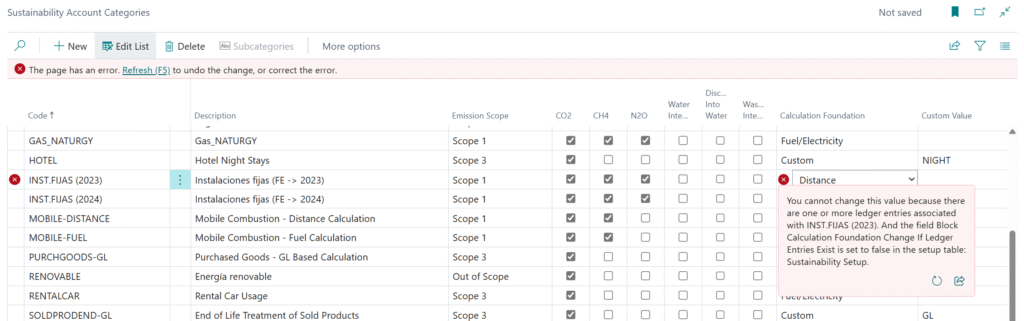
- Enable Background Error Check: This functionality is similar to existing features in other journals or documents within the application and is not specific to this module.
Procurement Group
This configuration group affects various complementary areas of the system (purchasing, manufacturing, finance, etc.). Activating each option indicates to the system that you want to enable sustainability features in areas like purchasing, products, resources, machine centers, etc. It’s essential for activating or deactivating sustainability functionality.
Important: By default, the system generates sustainability entries, but it also allows for the generation of sustainability value entries. To activate the latter, you must enable value chain tracking.
- Use Emissions in Purchase Documents
- Enable Value Chain Tracking
- G/L Account Emissions
- Item Emissions
- Item Charge Emissions
- Resource Emissions
- Work/Machine Center Emissions
Calculations Group
- Fuel/Electricity Decimal Places
- Distance Decimal Places
- Custom Amount Decimal Places
These fields allow you to set decimal precision for the respective areas.
Reporting Group
This group allows you to modify the unit of measure, factors, and rounding precision for emissions, specifically for reporting purposes:
- Emission Reporting Unit of Measure Code: How will you report your emissions? Tons? Kilograms?
- Reporting UOM Factor
- Emission Rounding Precision
- Emission Rounding Type
Deja una respuesta